
Improving framerate in Warhammer Online
Forum rules
READ THE STICKIED THREADS BEFORE YOU POST IN THIS SUBFORUM.
The answers you may seek are likely already there.
Thank you.
READ THE STICKIED THREADS BEFORE YOU POST IN THIS SUBFORUM.
The answers you may seek are likely already there.
Thank you.

Re: Improving framerate in Warhammer Online
Setting draw distance from video options to lowest did quite noticeable stutter reduction. Now forts are almost playable
Mostly harmless
K8P & Norn - guild Orz
K8P & Norn - guild Orz
Ads

Re: Improving framerate in Warhammer Online
i paste this config for nvidia inspector for AA.
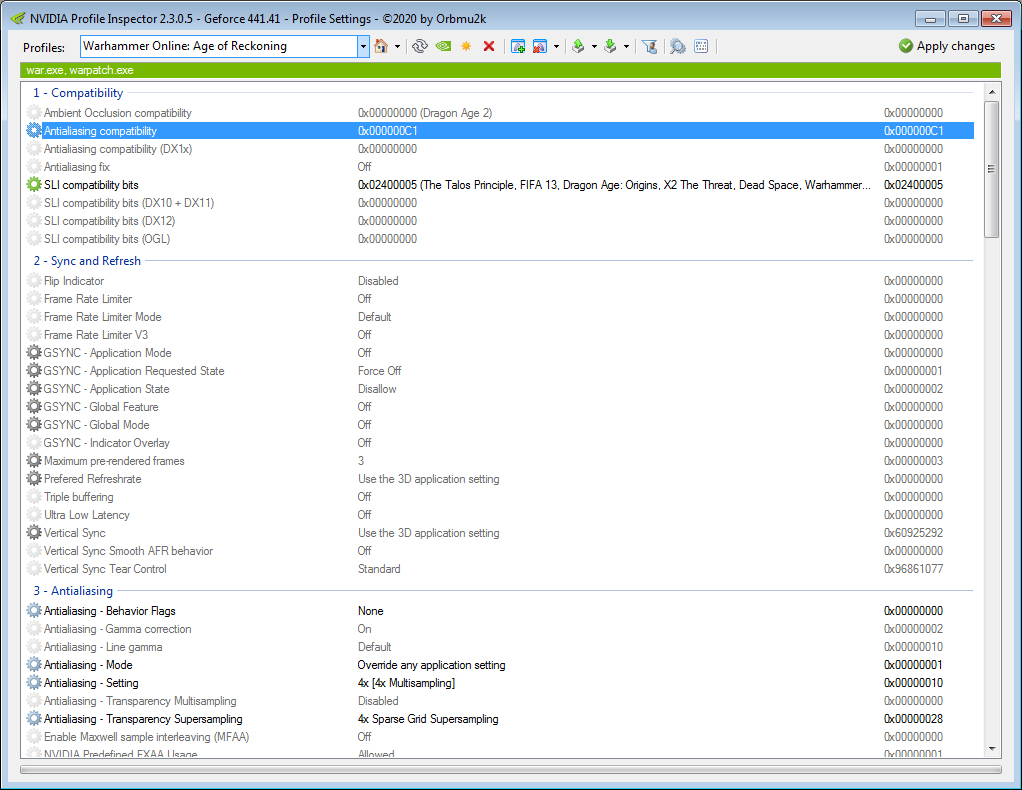
Perche choppa rr100 RIp
Dizparate squid rr100 Rip
Bayoneta vonsodomiten Dok
Froilan Borbon engi nerfed in last 2 patch.
Dizparate squid rr100 Rip
Bayoneta vonsodomiten Dok
Froilan Borbon engi nerfed in last 2 patch.

Re: Improving framerate in Warhammer Online
If during a long fight you experience a drop in game performance, but after your character dies, the game starts to work well even though the fight continues, change this:
esc>user settings>general>find: Show combat lighting on set for none. My game performance improved a lot.
esc>user settings>general>find: Show combat lighting on set for none. My game performance improved a lot.
Re: Improving framerate in Warhammer Online
If you use Windows 10 and Windows Defender, adding Warhammer Online as an Exclusion can increase performance.
Warhammer Online client creates a lot of cache files and if Windows defender is scanning them all the time that can impact your game performance.
You can follow the tutorial on the Microsoft website. to add the folder as an exclusion.
Alternatively, you can instead add the Process as an exclusion "WAR-64" or "WAR-32".
Warhammer Online client creates a lot of cache files and if Windows defender is scanning them all the time that can impact your game performance.
You can follow the tutorial on the Microsoft website. to add the folder as an exclusion.
Alternatively, you can instead add the Process as an exclusion "WAR-64" or "WAR-32".

Re: Improving framerate in Warhammer Online
NB: depending on add on installed shinies make you crash or just make you crash, this add-on is one of those that produces a general appcrash error 0x000005. Even if you disable DEP in system setting.
For me both version on indrith sites produces this.
For me both version on indrith sites produces this.
Re: Improving framerate in Warhammer Online
Anybody else having worse performance after patch?
RoR's folder and process aren't being scanned by Windows Defender, i'm playing on Fastest Framerate, using minimal addons, using the macro commands that stop/limit combat log, i have Process Lasso up and running.
Used to be fine before patch - for a time, as i would always have to close the game to delete cache folder after heavy fighting for a couple of hours. But now its unplayable, its back to the time when i didn't have Process Lasso up. If im playing a melee class, the second a blob comes in im down to 5 FPS.
RoR's folder and process aren't being scanned by Windows Defender, i'm playing on Fastest Framerate, using minimal addons, using the macro commands that stop/limit combat log, i have Process Lasso up and running.
Used to be fine before patch - for a time, as i would always have to close the game to delete cache folder after heavy fighting for a couple of hours. But now its unplayable, its back to the time when i didn't have Process Lasso up. If im playing a melee class, the second a blob comes in im down to 5 FPS.

Re: Improving framerate in Warhammer Online
This is up to date?
Founder member & Ex-2OiC Tercio de Estalia (2019-23)
Que buen vasallo si tuviera buen señor
Proud Soldier "LOS AUTONOMOS" (Since 2025)
El Campeador estaba alegre, igual que todos los suyos, cuando su estandarte ondeó en lo alto del alcázar
Que buen vasallo si tuviera buen señor
Proud Soldier "LOS AUTONOMOS" (Since 2025)
El Campeador estaba alegre, igual que todos los suyos, cuando su estandarte ondeó en lo alto del alcázar

Re: Improving framerate in Warhammer Online
This is long overdue for a rewrite, but some advice is still relevant. Off the top of my head: toning down shadows, toning down draw distance, not running Daocbuff alongside Buffhead, avoiding GroupIcons and using conservative settings for group icons in Enemy, disabling killspam tracker in Enemy turning off disk chat logging, turning off indexing service in Windows.


Ads
Who is online
Users browsing this forum: No registered users and 3 guests
Sitemap
Account
CSS 3 and HTML 5 compliant



Copyright © 2013 - 2024 Return of Reckoning Ltd. All rights reserved.