The launcher has been rebuilt from the ground up. Here is everything that has changed since the live launcher.
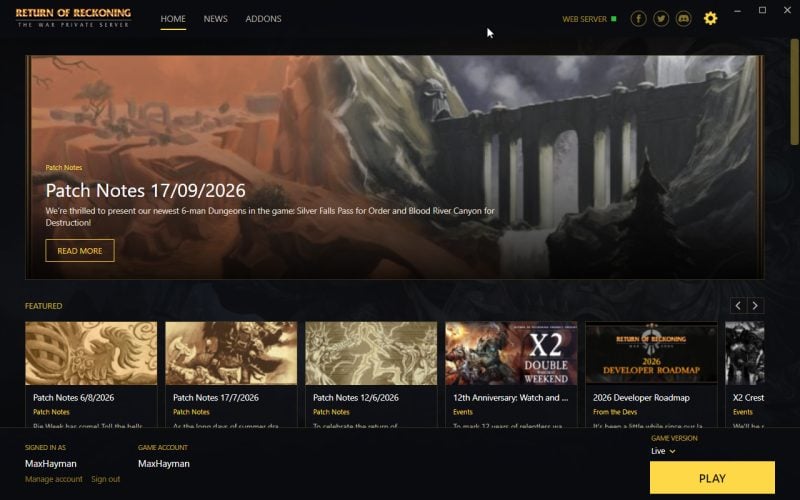
Highlights
- A new, resizable launcher with a Home page, news and videos, in ten languages
- You sign in with your Return of Reckoning account
- A new download system with verified installs and updates and a proper install screen
- A built-in addon manager with curated packs and UI profiles
- The launcher updates itself, so the separate updater is gone
Signing in
- Sign in with your Return of Reckoning account. Two-factor authentication, signing in through your browser and creating an account are all built in.
- You can stay signed in between launches.
Installing and updating the game
- A new install screen lets you choose the folder and game language, and shows the space needed against your free space before anything downloads.
- Only your language's voice-over and video files are downloaded. Changing language in Settings swaps them over.
- Every download is checked before it is written to your game files.
- Updates show speed, size remaining and time left. You can pause them or set a download speed limit.
- Free disk space is checked before and during an update.
- Verify game files re-checks your whole install and repairs anything damaged.
- Game archives are tidied in the background after an update, so they no longer keep growing.
- The launcher no longer needs to run as administrator. If Windows blocks the game folder, it offers to fix the folder's permissions once.
The launcher
- A new resizable window with Home, News, an article reader and forum highlights.
- Watch YouTube videos and Twitch streams inside the launcher.
- Available in English, French, German, Italian, Spanish, Russian, Japanese, Korean, Simplified Chinese and Traditional Chinese.
- Launcher updates install in place. If a new version won't start, the launcher goes back to the previous one automatically.
Addons
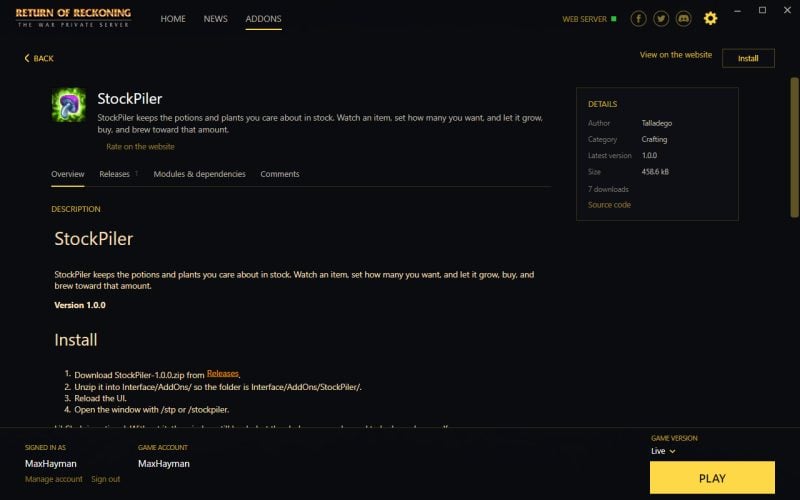
- A new Addons page: browse addons from the Return of Reckoning addon registry by category, and install, update or remove them.
- Each addon shows its rating and screenshots.
- Optional automatic addon updates, checked after patching and never while the game is running. You can also opt in to beta versions.
- Addon packs install a curated set in one click. Pack updates are opt-in and shown as a list of changes, and the launcher never deletes an addon without asking you.
- UI profiles install a pack's interface layout onto the characters you choose. Anything replaced is backed up first.
Fixes
- The launcher no longer keeps running in the background after you close it, or crashes when you reopen it.
- Downloads retry automatically when a connection drops.
- Each Windows user gets their own log, the previous session's log is kept, and crashes are recorded, which makes support requests easier.
Download
The new launcher is available as an optional opt in beta test for now.
If you would like to test it please download it from here and place it into your Warhammer Online game folder.
https://launcher.returnofreckoning.com/beta/RoRLauncher.exe
It will be released to all clients later after this beta round.